Megaupload
Today, 22 June 2009 / 1 Tir 1388, Megaupload.com got blocked in Iran too 
So what's next???

Google Adds Persian to its Translation Tool
Although it is still in its alpha stage and is not perfect yet, it is indeed a Wowing news to see Google -forbidding Iranians to access some of its certain pages or downloading its products like Google Chrome and toolbar due to sanctions- is finally adding Persian to its translation tool too 
more reading:
Google Translates Persian

Stupidity Has No Boundaries
and that's when the stone-minded authorities of Iran suddenly decide to have the whole blogger images BLOCKED just because of one pic not being favored by them!!!
and below is the very ugly page you see when you click on an uploaded-to-blogger image like this one: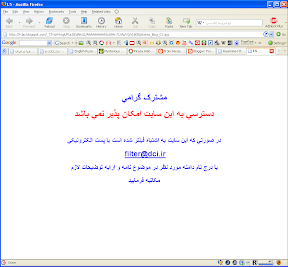
@#$%^&*
Edit: it is finally solved.
3D Parse
At the 3DParse you can find some beautiful images and movie clips of 3D reconstructed Persepolis done by Mr. Meysam Keshavarz. He's really done a magnificent job and deserves a thumb up or two ;-)

Super Sonic Internet of Iran!!!
I have a DSL 256K subscription and should really thank God that I was an old subscriber and managed to save my broadband connection as an ordinary Home user! You ask why, I tell you. Following a ridiculous sort of law established in 2006, it became all of a sudden totally forbidden for the home users to have internet speedier than 128K!!!! But wait a minute, you may also laugh your heads out more when you learn it's recently announced that a 56K internet connection is more than enough for Iranian users needs and this is out of mere generosity that they are also provided with a 128K connection!!!
OK, now you may say it's not that much bad after all but it is when you exclude some factors such as high prices and awful connection speed quality. I, as a 256K user, am experiencing a speed equal to that of a dial up! Only very early in the mornings and pretty late at nights, when the network traffic is not at its peak I can have an acceptable speed.
Also it seems that the recent non-stop power failures occurring day and night due to the electricity shortage is worsening the situation even more by burning out the ISP's delicate electronic devices.
Poof, just check my ping for yahoo.com today and see for yourself what quality services are delivered and you can do nothing about it but signing petitions to which no authority pays a single attention (like this one: High Speed Internet Connection Is One Of Requirmenet Of Iranian People ) :
Pinging yahoo.com [68.180.206.184] with 32 bytes of data:
Reply from 68.180.206.184: bytes=32 time=347ms TTL=51
Request timed out.
Reply from 68.180.206.184: bytes=32 time=342ms TTL=51
Reply from 68.180.206.184: bytes=32 time=352ms TTL=51
Request timed out.
Reply from 68.180.206.184: bytes=32 time=356ms TTL=51
Reply from 68.180.206.184: bytes=32 time=338ms TTL=51
Reply from 68.180.206.184: bytes=32 time=356ms TTL=51
Reply from 68.180.206.184: bytes=32 time=341ms TTL=51
Reply from 68.180.206.184: bytes=32 time=342ms TTL=51
Reply from 68.180.206.184: bytes=32 time=339ms TTL=51
Reply from 68.180.206.184: bytes=32 time=340ms TTL=51
Reply from 68.180.206.184: bytes=32 time=339ms TTL=51
Reply from 68.180.206.184: bytes=32 time=346ms TTL=51
Reply from 68.180.206.184: bytes=32 time=355ms TTL=51
Request timed out.
Reply from 68.180.206.184: bytes=32 time=341ms TTL=51
Request timed out.
Reply from 68.180.206.184: bytes=32 time=351ms TTL=51
Reply from 68.180.206.184: bytes=32 time=366ms TTL=51
Reply from 68.180.206.184: bytes=32 time=371ms TTL=51
Reply from 68.180.206.184: bytes=32 time=389ms TTL=51
Reply from 68.180.206.184: bytes=32 time=390ms TTL=51
Reply from 68.180.206.184: bytes=32 time=375ms TTL=51
Reply from 68.180.206.184: bytes=32 time=375ms TTL=51
Request timed out.
Request timed out.
Request timed out.
Request timed out.
Request timed out.
Request timed out.
Request timed out.
Request timed out.
Reply from 68.180.206.184: bytes=32 time=341ms TTL=51
Reply from 68.180.206.184: bytes=32 time=338ms TTL=51
Reply from 68.180.206.184: bytes=32 time=340ms TTL=51
Reply from 68.180.206.184: bytes=32 time=337ms TTL=51
Reply from 68.180.206.184: bytes=32 time=336ms TTL=51
Reply from 68.180.206.184: bytes=32 time=341ms TTL=51
Reply from 68.180.206.184: bytes=32 time=336ms TTL=51
Request timed out.
Reply from 68.180.206.184: bytes=32 time=354ms TTL=51
Reply from 68.180.206.184: bytes=32 time=342ms TTL=51
Request timed out.
Reply from 68.180.206.184: bytes=32 time=348ms TTL=51
Reply from 68.180.206.184: bytes=32 time=340ms TTL=51
Reply from 68.180.206.184: bytes=32 time=349ms TTL=51
Reply from 68.180.206.184: bytes=32 time=338ms TTL=51
Reply from 68.180.206.184: bytes=32 time=345ms TTL=51
Reply from 68.180.206.184: bytes=32 time=337ms TTL=51
Reply from 68.180.206.184: bytes=32 time=336ms TTL=51
Reply from 68.180.206.184: bytes=32 time=337ms TTL=51
Reply from 68.180.206.184: bytes=32 time=339ms TTL=51
Reply from 68.180.206.184: bytes=32 time=346ms TTL=51
Reply from 68.180.206.184: bytes=32 time=345ms TTL=51
Ping statistics for 68.180.206.184:
Packets: Sent = 55, Received = 41, Lost = 14 (25% loss),
Approximate round trip times in milli-seconds:
Minimum = 336ms, Maximum = 390ms, Average = 348ms
Teddy Bear MP3 Player


That Annoying Auto Restart Message after Windows gets Updated @_@
I am not sure about you but I DO hate it when I am in the middle of doing something with loads of windows and browser tabs open and I am cruelly required by the Windows Automatic Update to restart my computer to have it complete o_O So I searched the web and came across this, this and this. Some of their easier solutions read as follows:
- Click Start, Run and enter the command net stop wuauserv
- Click Start, Run and enter the command net stop "automatic updates"
- Navigate to Control Panel, Administrative Tools, Services. Right click the Automatic Updates service and stop it
UPDATE:
The first method looked like a working one at first, but then appeared as a semi-successful one on my Windows XP Professional SP2! OK, I typed and ran it using the run box :

The MS-DOS window opened and the "The Automatic Service is Stopping" message showed up :

Well, I noticed the yellow security icon in my taskbar (next to windows clock) and the wau(something).exe both disappeared. 30 minutes passed and I was about to breath a sigh of relief and celebrate my finally overcoming the auto-restart problem that a dialogue box suddenly popped upout of of nowhere! Oh noooooooooo, that was the same annoying auto restart message by the windows update BUT this time, it wasn't counting down to restart the computer, it was just asking to wether restart or cancel the process till some later time (30 minutes later I guess!) :

Well, although I didn't get totally rid of the auto-reboot thingy, it is yet good to know it won't restart my computer after counting 1-2-3 and boom any more!! Hmm, I don't think the methods number 2 and 3 would do any better than this as they are somehow the same as the 1st one. Interesting enough it seems that these work fine for everybody running Windows XP except me :-(
Update 2: Now I am testing the 3rd method as this auto-restart message appearing every now and then is Really really annoying even if it doesn't count down >_<
.


